At a glance
Your categories, business name and description are the basic information that tells Google and customers what kind of business you are. Google asks businesses to use the name they actually use and the category that best describes the business.
Matching your real operations comes before adding business types or keywords that look good for search. When these details agree, customers can tell straight away whether you are the place they were looking for.
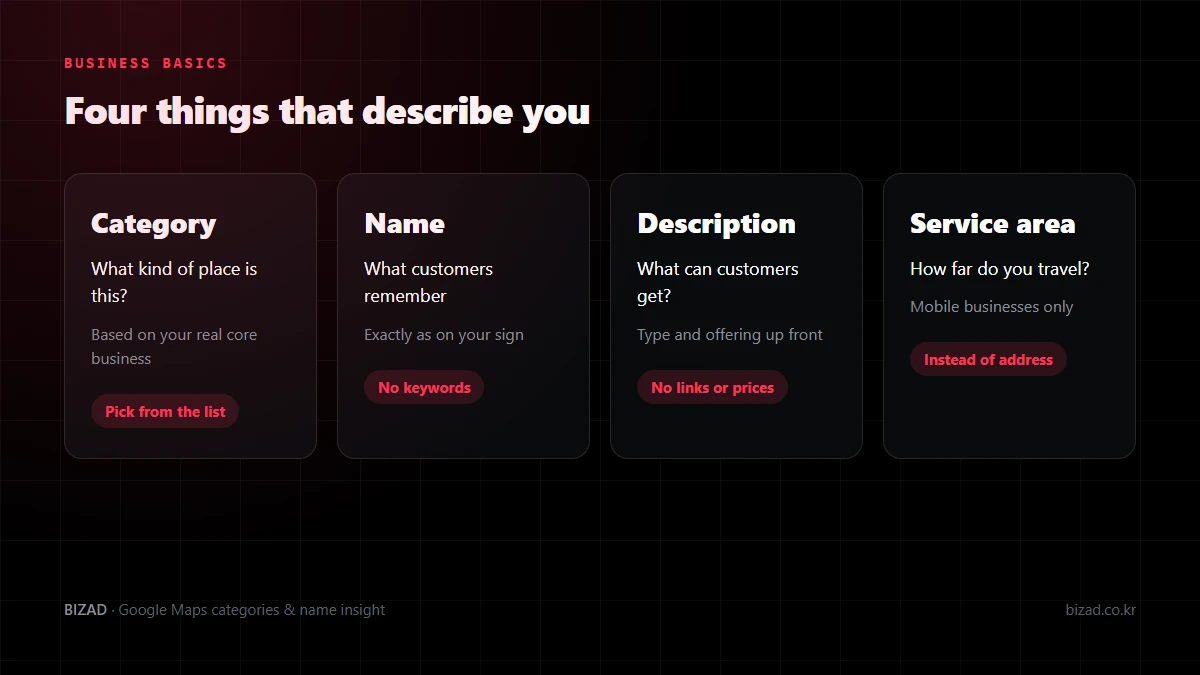
How should I choose my Google Maps category?
Choose it based on the core business you actually run. Google asks businesses to select the category that best describes what the business really does.
Before picking a category, try describing your business in one sentence. Writing down what customers come to you for and what you mainly do today gives you something to compare against.
- What are your signature products and main services?
- How do your sign and website describe the business?
- What kind of place would a first-time customer think this is?
Rather than picking a business type that seems to get lots of searches, start by accurately describing the business you offer customers now. Use other businesses’ settings only as a reference, not something to copy.
What is the difference between primary and additional categories?
The primary category is the one business type that represents you, and additional categories describe other businesses you genuinely run alongside it. They are not for attaching a category to every product you sell.
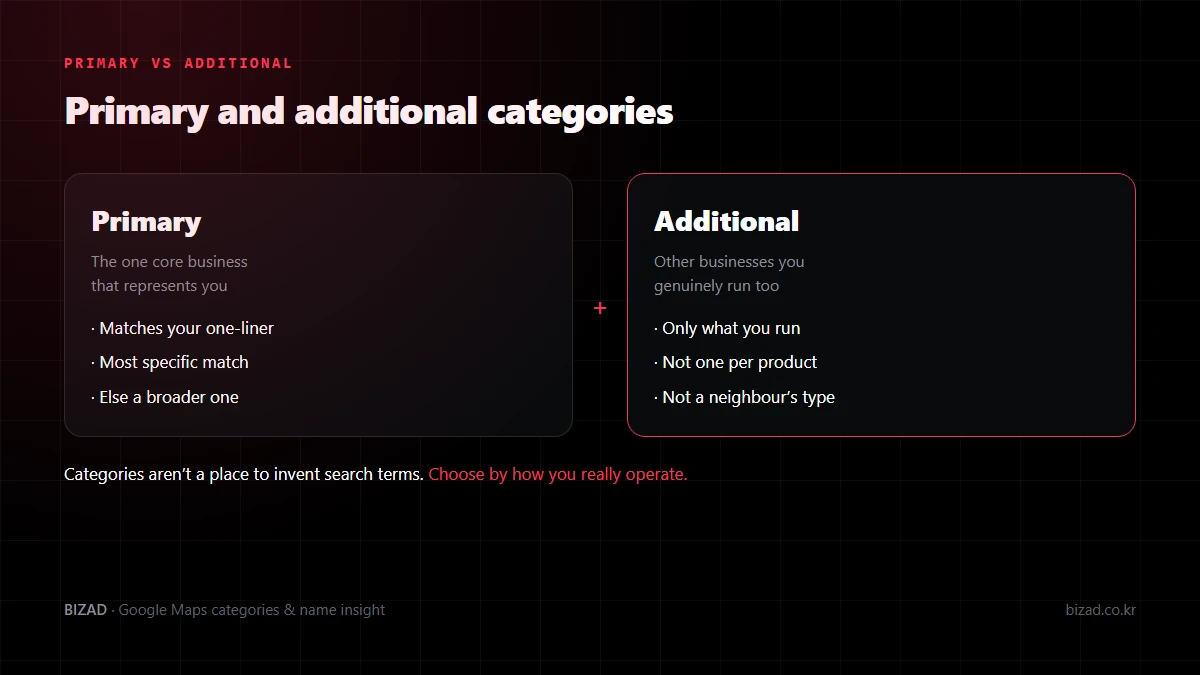
For example, a café that sells coffee and cakes should first establish its core way of operating before adding both products as business types. Ask whether something is enough to show on the menu, or whether you really run a separate business.
Adding services you don’t offer as additional categories can lead customers to enquire with the wrong expectations. Another business’s type is also no reason to add a category, even if it is in the same building.
What if the category I want isn’t in the list?
Choose a broader item from the list that still describes your business. Categories can only be chosen from the set list; it is not a box for inventing the search terms you want.
Adding place names or promotional words to create a new business type doesn’t work. When there is no specific item, pick the broader one and explain the details in your services, menu and description.
We also don’t recommend choosing a business type that doesn’t match reality just to unlock a feature. Available features can vary by category, but your business type should be based on how you actually operate.
What should I check when I change my category?
Check that your menu, photos and description describe the same business as the new category. If you change only the category and leave the old menu or photos, customers have to work out again what they can actually get.
- Record the previous setting and the reason for the change, with the date.
- If you are asked to verify again after saving, check what the screen requires.
- If several people manage the profile, share what was changed.
- With several branches, list the shared business type and each branch’s different services in one table.
We don’t recommend switching repeatedly to unrelated items just because results didn’t change straight away. At BizAd, we first narrow down category candidates by business type, then confirm each shop’s real operations before settling on the final category.
How should I enter my business name?
The rule is to use exactly the name shown on your sign and used in your shop. Google asks that the business name reflect the name the business really uses, and does not allow place names or promotional phrases to be added.
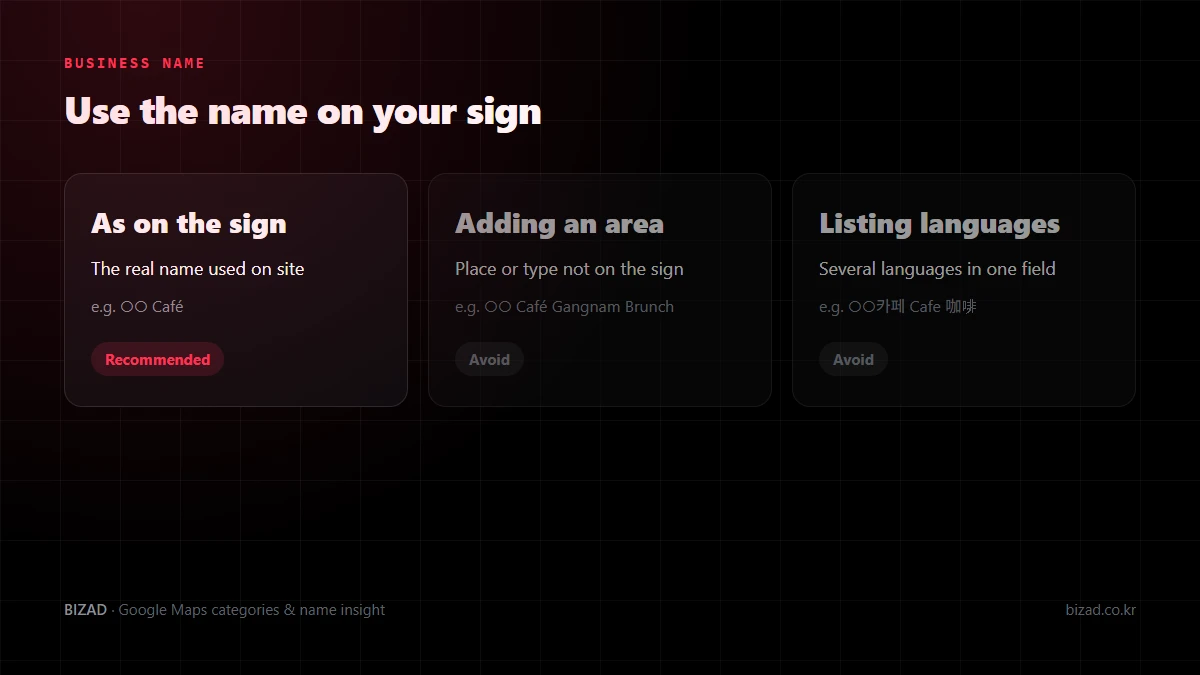
Put the names used on your sign, official website and in-store materials side by side. If spacing or the English spelling differs, settle on the version you use consistently on site.
A branch name can be included if it is genuinely part of the name, but that is different from adding a place name for search. Signature dishes, discounts and opening hours stay out of the name and go in their own fields.
If my business name changed, do I just edit the name?
It depends. What you need to check differs depending on whether you are correcting how the same shop’s name is written, rebranding, or have become a different business altogether.
| Situation | What to check |
|---|---|
| Fixing a typo or spacing | The spelling used on your sign and official channels |
| Rebrand of the same business | New sign, supporting documents, notice to customers |
| New operator or business type | Whether the existing profile can still be used |
Simply renaming a previous business’s profile and using it as a new business may not be appropriate. Rather than deciding just to keep the old reviews, first make sure customers won’t be confused about which business the reviews they read describe.
After changing the name, check that the old name isn’t left on your website, booking page or social media bios. Changes may need review, so it is best not to promise customers the change will show immediately.
Can I add English or Chinese to my business name for foreign customers?
If it isn’t a form of the name you actually use on your sign, it is better not to. Stringing Korean, English and Chinese names together in one field makes the name harder to read and may not follow the guidelines.
If a foreign-language name really is used on your sign or in your official branding, first pin down exactly how it is written. It is safest to decide after checking both your real branding and Google’s naming rules.
We recommend putting the words foreign customers might search for into your description, menu item names and services rather than the business name. Keep the name simple so customers can remember it and find you again.
How should I write my Google Maps description?
Explain in the first sentence what kind of business you are and what customers can get. First-time visitors want to know what they can do there before they want your brand story.
- 01First sentence — state your business type and main offering in one sentence.
- 02Highlights — pick signature dishes or services you offer consistently.
- 03How it works — cover things people wonder about before visiting, such as whether to book and what the space is like.
- 04For foreign visitors — mention languages you can genuinely serve customers in.
- 05Review — compare it with how staff explain things to customers, and look for exaggerations or gaps.
A Google Business Profile has just one description field, with no separate field for each language. If many of your customers are from abroad, decide in advance which languages to use within that one field, and in what order.
Keywords should sit naturally in sentences customers understand. Repeating your area and business type doesn’t make a description more useful, and no description on its own guarantees a top ranking.
Is there anything I shouldn’t put in the description?
Yes. Google restricts links in the description, as well as content focused on discounts, prices or sales promotions.
- Website, social media or booking links — use the dedicated link fields.
- Discounts, prices and limited-time offers — share them in your menu or posts.
- Unsupported superlatives or unverified rankings
- Lists of search terms made of place names and business types
- Dishes and services you no longer offer
Rather than squeezing everything into one field, split information so customers can find it where they expect it. If you have several branches, also check that nothing a particular branch doesn’t offer has slipped in.
How should a mobile business set its service area?
If customers don’t come to your premises and you go to them instead, the rule is to hide your address and set a service area. A visible address tells customers they can come to you in person.
If you serve customers at your premises and also travel to them, check whether you can set up both. In that case you also need to meet shopfront standards, such as permanent signage and actually being available during the hours you list.
- Only include areas you can actually visit or deliver to.
- Set your core area based on travel time, staff and the hours you can work.
- Don’t create branches that don’t exist to make it look as if you have a shop in each area.
- Check that the service area on your website and booking pages is the same.
A wider service area doesn’t necessarily mean more enquiries. If you keep getting enquiries from areas you can’t cover, it is worth reviewing your service area settings.
Category, name and description checklist
Start by checking your basic business information against the list below.
- I have described my core business in one sentence.
- My primary category matches my real core business.
- Additional categories only cover businesses I really run.
- I recorded the date and reason for any category change.
- My business name matches my sign, with no place names or promotional phrases added.
- I have distinguished a name change from registering a new business.
- The first sentence of my description states my business type and main offering.
- My description has no links, no discount- or price-focused content and no unsupported superlatives.
- As a mobile business, I set a service area I can really cover instead of showing my address.
- The name and description on my website and social media are consistent with my profile.
In closing
Your categories, business name and description aren’t the place to hunt for search-friendly words; they are where you describe your business accurately. When the information matches your real operations, both Google and customers understand you as the same business.
Start by checking whether your primary category reflects your main service and whether your business name matches your sign. If foreign customers matter to you, also check that your description covers what they will want to know.
We’ll start by checking whether your categories, name and description match how you actually operate.
Free audit