At a glance
Google Maps SEO means getting your business information in order so that Google understands your business accurately. Google says local results are based mainly on relevance, distance and prominence.
Of these, distance is out of your hands, but relevance can be improved and prominence can be built over time. That is why it pays to sort out your categories and business details before chasing more reviews.
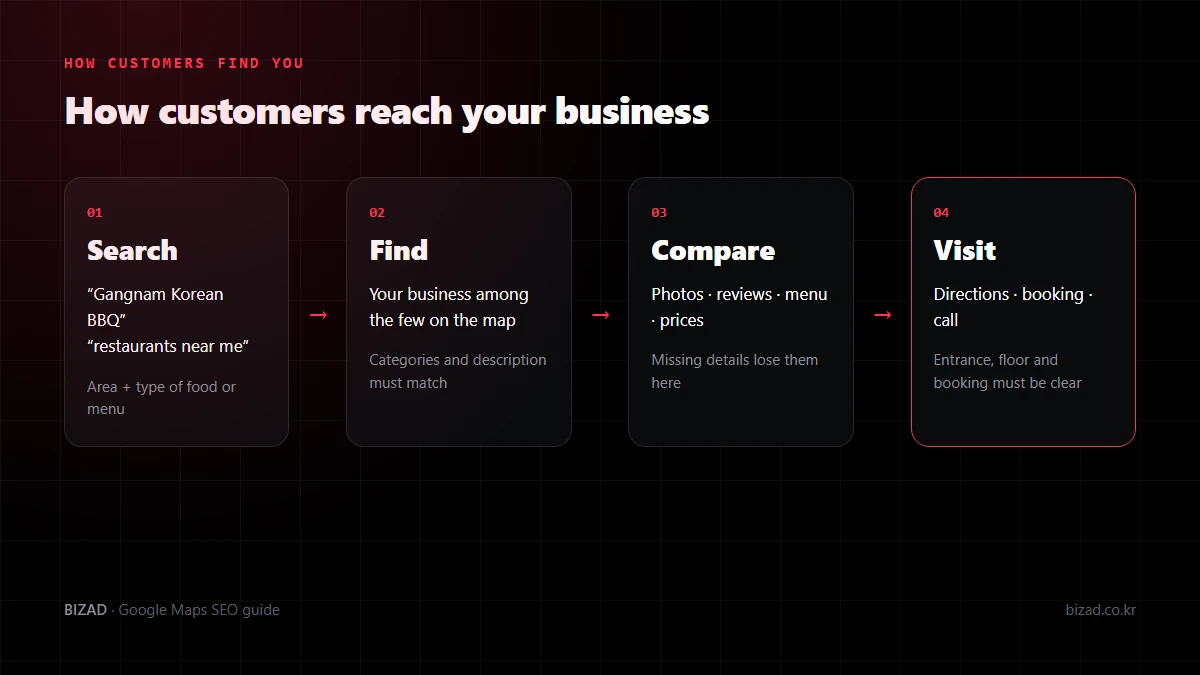
What is Google Maps SEO?
Google Maps SEO is the work of tuning your Google Business Profile and other online information so that your business connects with searches for your area, type of business and menu. It is more than simply adding your business to Google Maps.
Say you run a Korean beef (hanwoo) restaurant in Gangnam. Customers might search for:
- 강남 한우, 강남 고기집, 강남 맛집 (in Korean)
- Gangnam Korean BBQ, Gangnam Hanwoo beef
- 江南 韩牛, 江南 焼肉
If Google only understands your business as a generic restaurant, it is hard to match searches for hanwoo. Your categories, menu and description need to make it clear that you are a hanwoo restaurant in Gangnam.
What decides your Google Maps ranking?
Google officially states that local search results are decided mainly by three things: relevance, distance and prominence.
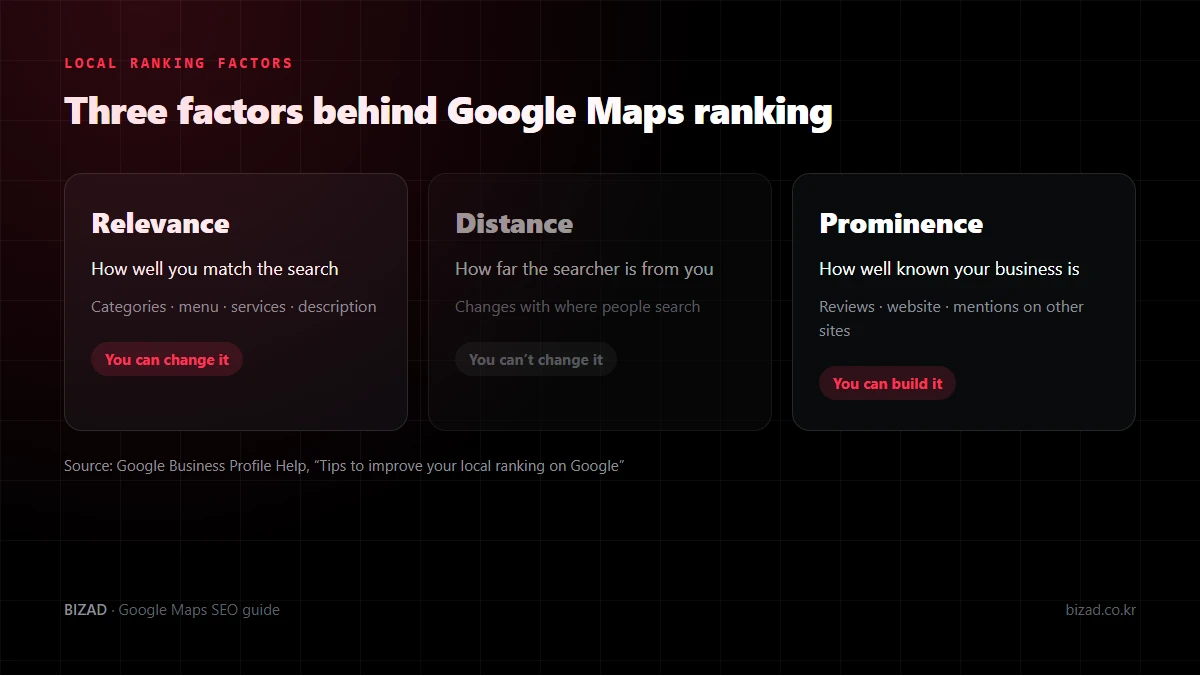
Relevance is how well your business matches what the customer searched for. Accurate categories, menu, services and description improve it.
Distance is how far the searcher is from your business. It is not something you can change.
Prominence is how well known your business is, online and offline. Google says it looks at reviews as well as your website and information on other sites.
So ranking well on Google Maps is never solved by managing one thing. Understand all three, and start with the two you can influence: relevance and prominence.
Will lots of reviews put you at the top of Google Maps?
No. Reviews alone don’t decide your ranking. Google says a higher number of reviews and positive ratings can help local ranking, but they are one factor among several.
If your categories and details don’t match the search, or the searcher is far away, more reviews won’t fix it. Before chasing reviews, check how Google currently understands your business.
There are also rules to follow when managing reviews.
- Offering discounts or freebies in exchange for reviews is not allowed under Google’s policies.
- Placing a review QR code or link in your store and showing real customers how to leave a review is fine.
- Write replies that match each review. For complaints, check the facts and explain how you will improve.
Why does your Google Maps ranking change from place to place?
Because the searcher’s location is built into the results. You may rank first for “Gangnam restaurant” inside your store, yet see a different result a few kilometers away.
Foreign customers in particular tend to search from their hotel, a subway station or a sightseeing spot rather than right outside your door. So it is better to check your ranking from several points around your business, not just one.
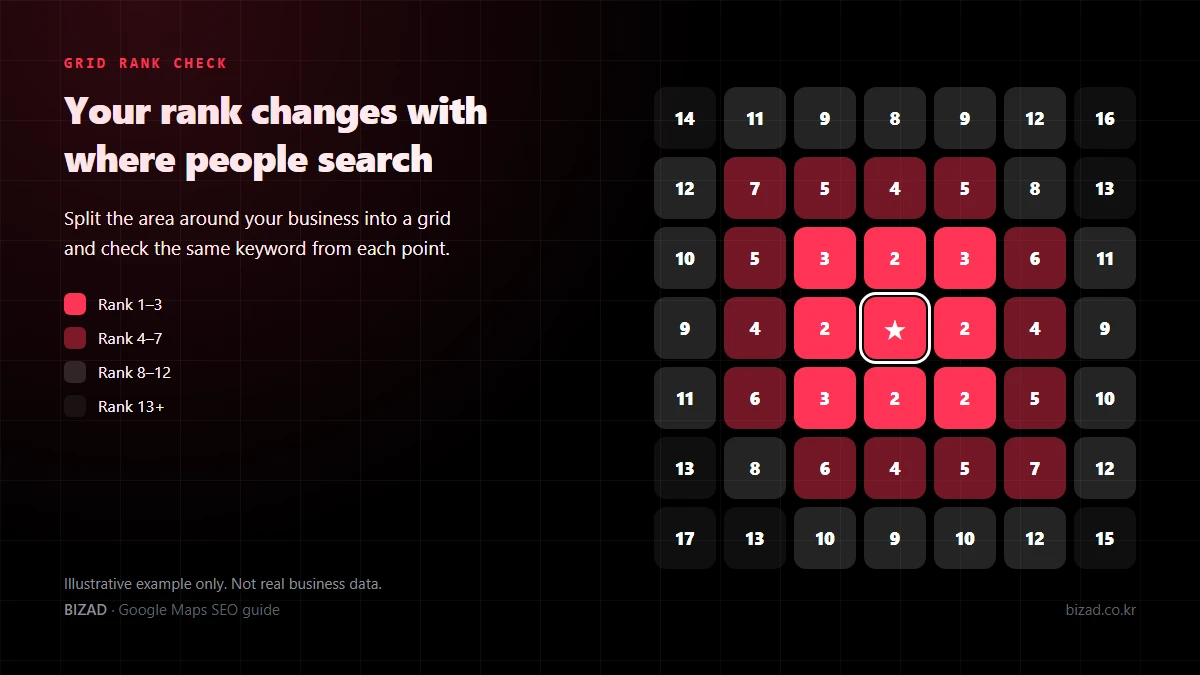
At BizAd we divide the area around a business into a grid and check rankings keyword by keyword. Instead of “what rank are we?”, this shows “where are we strong, and where are we weak?”, which makes it much easier to decide what to fix next.
Which keywords should you track?
Base them on the words customers actually type. For a restaurant, try splitting them into “area + restaurant”, “area + type of food” and “area + menu”.
| Pattern | Korean | Other languages |
|---|---|---|
| Area + restaurant | 강남 맛집 | Gangnam restaurant |
| Area + type of food | 강남 한식 | Gangnam Korean food |
| Area + menu | 강남 한우 | Gangnam Korean BBQ, 江南 烤肉 |
The same business can rank differently for different keywords. You might rank high for “Gangnam hanwoo” but lower for the far more competitive “Gangnam restaurant”, and English searches may face a different set of competitors altogether.
If foreign customers matter to you, check English, Chinese and Japanese keywords as well as Korean ones.
Where should you start with Google Maps SEO?
Start with the basic information in your Google Business Profile. Google also says businesses with complete and accurate information are more likely to appear in local results.
Working through it in this order saves you doing the same job twice.
- 01Verification and access — first confirm that you can actually manage the profile.
- 02Business name — check it matches your real sign.
- 03Primary and additional categories — choose the ones that describe your core business most precisely.
- 04Address, phone number and hours — make sure they are current.
- 05Menu, services and description — list only what you actually offer, in words customers understand.
- 06Photos — show your exterior, entrance, interior and signature items as they look today.
- 07Website — check the name, address and phone number match your profile.
- 08Rankings by keyword and by area — find the weak spots and refine again.
What Google shows needs to match what your business really offers. Filling every field is not the point.
Does adding keywords to your business name help?
It’s best not to. Adding area names, business types or foreign-language words that aren’t on your sign is not allowed under Google’s guidelines.
A name like “○○ Cafe | Best Brunch in Gangnam | Gangnam Cafe” can be changed by a competitor’s suggested edit or by Google’s review, and the profile can even be suspended. The more reviews a business has built up, the more it stands to lose.
Put foreign-language keywords naturally into your description, menu item names and posts instead. Keeping your name exactly as it appears on your sign is the safe choice.
What else should you prepare for foreign customers?
Prepare the information foreign customers need to understand your menu, book and find you. Even after finding you in search, they will hesitate if this is missing.
- Menu and prices in foreign languages, including any extra charges
- The languages your staff can actually speak
- How to book and any conditions (open your booking link on a phone and check it yourself)
- Building entrance and floor (an entrance photo helps a lot if you are inside a larger building)
- Payment options, such as overseas cards
If you say “English spoken”, make sure someone can actually help in English. When what customers see online doesn’t match reality, they don’t come back.
Turn on attributes such as amenities and payment methods only when they are true. Google’s sample bulk-upload file sets “women-owned = yes” by default, so copying it as-is switches that attribute on for every location. At BizAd we only add attributes we have confirmed for each business.
Does your website affect your Google Maps ranking?
Yes, it does. Google explains that it gathers business information not only from what owners enter but also from publicly available web content.
So your website should make it clear where you are, what kind of business you are and what you offer. A hanwoo restaurant in Gangnam should make Gangnam, hanwoo, the menu, address, hours and contact details easy to find on its site too.
If your name, address and phone number differ between your Google profile and your website, neither Google nor AI search can easily tell they are the same business. Keep them identical everywhere.
How should you measure Google Maps results?
The Performance view in Google Business Profile shows views, direction requests, call-button taps and website clicks. Keep in mind that each of these is a different stage.
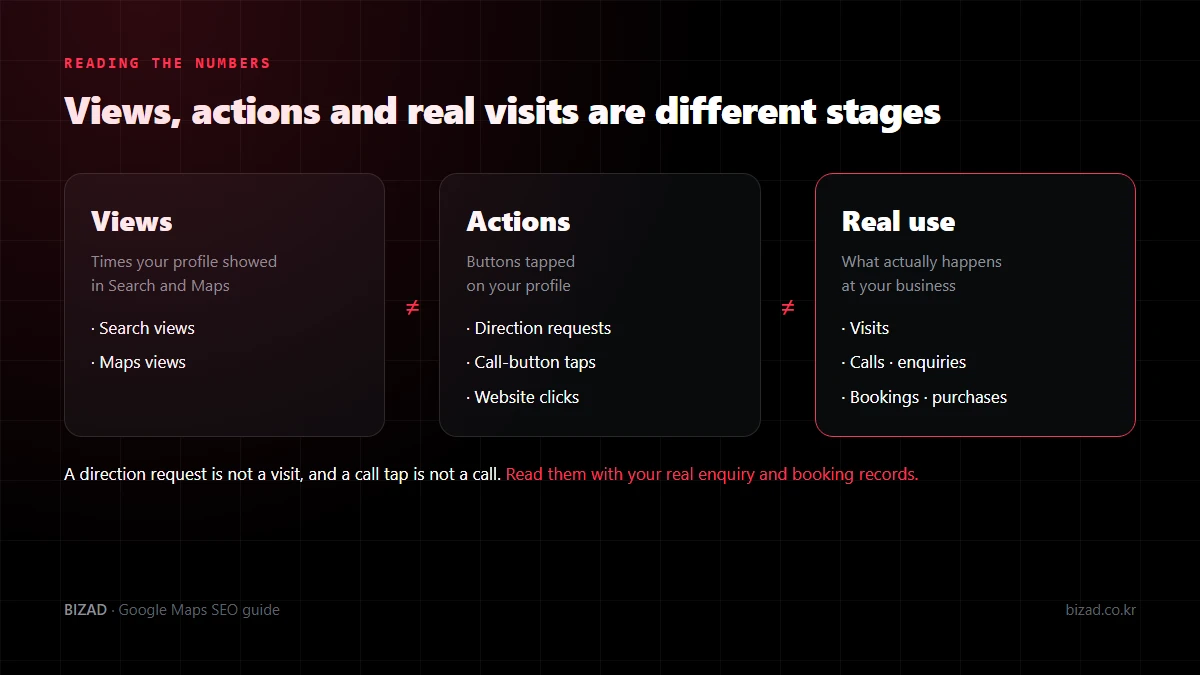
A direction request is not a visit, and a call-button tap is not a completed call. A website click is not a booking or a purchase either.
We recommend reading the numbers this way.
- Compare periods of the same length, and note days with different conditions such as closures or events.
- Put your actual enquiry and booking records next to the map figures.
- Log changes such as new photos or menu updates with their dates.
- If you ran ads, remember that ad activity may be included in your performance figures.
Don’t assume every rise is down to Google Maps work. Separating confirmed facts from guessed causes makes it much easier to decide what to fix next.
Google Maps SEO checklist
Start by checking your business against the list below.
- I have confirmed profile verification and access.
- My business name matches my real sign.
- My primary category matches my core business.
- Additional categories only cover what I really offer.
- Address, phone, hours and closed days are up to date.
- My menu, services and description list only what I really offer.
- Exterior, entrance, interior and signature-item photos show how things look today.
- I have only turned on attributes that are true.
- I ask for reviews without incentives and reply to what each one says.
- My website’s name, address and phone match my profile.
- I track rankings by keyword and by area, including foreign-language keywords.
- I read performance figures alongside real enquiry and booking records.
In closing
Google Maps SEO isn’t about finding one special trick to jump the rankings. It is a process of getting your basics right so Google understands your business, checking which keywords and areas you show up for today, and fixing the gaps one by one.
For restaurants, clinics, cafés and tourism businesses that depend on foreign customers, Google Maps is a search channel you can’t afford to miss. Start by checking which keywords you appear for, and how far that reaches.
We’ll start by showing you which keywords you appear for today, and in which areas.
Free audit